Dahgo: A Modern Sans Serif Font for Digital Design
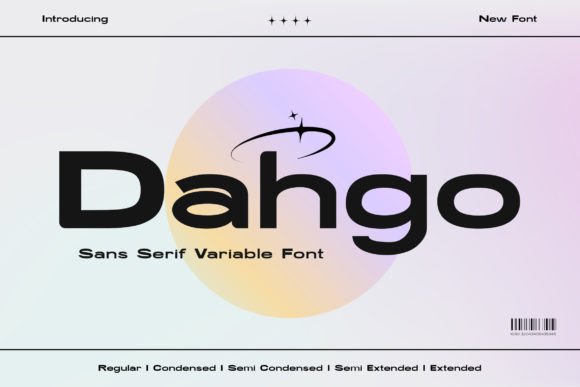
As a UI designer who ships dozens of landing pages, SaaS dashboards, and e-commerce experiences each year, I pay close attention to how a font behaves—not just how it looks. Dahgo stands out because it’s built for the web first: a versatile sans serif variable font that delivers consistent rhythm, crisp readability, and expressive flexibility across every screen size and context.
Dahgo’s letterforms are clean and purposeful—neither overly geometric nor excessively humanist. There’s subtle warmth in its curves, balanced contrast in stroke weight, and generous x-heights that boost legibility at small sizes. Its variable axis gives precise control over weight (from 300 to 700), width (condensed to normal), and optical sizing—meaning you can fine-tune how Dahgo renders in a hero headline versus a mobile navigation bar without loading multiple files.
Where Dahgo Excels in Real Digital Layouts
In hero sections, Dahgo’s bolder weights command attention without shouting. I’ve used it for SaaS product headlines over gradient backgrounds—its even spacing and open counters prevent visual crowding, even with tight line-heights. For boutique online stores, I apply the semi-condensed width variant in banner text: it fits more copy in limited horizontal space while preserving elegance and scannability.
On course sales pages or coaching websites, Dahgo works especially well for section headers and benefit-driven subheadings. Its clarity supports quick scanning—critical when users decide in under three seconds whether to scroll or bounce. I pair it with a neutral body font like Inter or Open Sans for long-form content, letting Dahgo anchor hierarchy without competing for cognitive load.
For buttons and CTAs, I use Dahgo at weight 600 with tight letter-spacing. It feels intentional and confident—not aggressive, not timid. On dark mode interfaces, its slightly increased contrast ensures readability without glare. Over image overlays, I often add a subtle text shadow or background tint; Dahgo’s sturdy proportions hold up where delicate fonts blur or vanish.
Brand Tone and Visual Consistency
Dahgo isn’t a “personality-first” display font—it’s a tone-shaping tool. Its restrained confidence makes it ideal for brands that value approachability *and* authority: think fintech startups, wellness platforms, creative agencies, or design-led hardware brands. It doesn’t distract from your message; it reinforces it through consistency.
I recently used Dahgo across an entire brand kit for a sustainable apparel client—same font family for logo lockup (using custom kerning and alternate ‘g’), navigation labels, product cards, email headers, and social media graphics. Because it scales cleanly from 14px captions to 96px hero titles, we maintained typographic harmony without juggling five different fonts.
Responsive Readability and Practical Usage Tips
On mobile, Dahgo shines at 16–18px for body text and 24–32px for headings. Its variable nature means you can adjust optical size dynamically via CSS @font-face descriptors—no JavaScript required. For touch targets like small filter buttons or tab labels, avoid ultra-light weights; stick to 500+ for sufficient stroke definition.
Over light backgrounds, Dahgo’s default weight 400 reads cleanly down to 14px. On dark backgrounds, bump to 500 and increase line-height by 4–6% to maintain breathing room. When layered over photos, test contrast ratios using browser dev tools—Dahgo meets WCAG AA at 18px+ on most mid-tone overlays.
Smart Font Pairing for Web Design
Dahgo pairs naturally with both neutral and expressive companions. For editorial blogs or knowledge-based sites, try pairing its medium weight with a warm serif like Crimson Pro or Literata—Dahgo handles headlines and pull quotes while the serif carries narrative depth. For minimalist portfolios or digital art platforms, combine it with a quiet monospace like Recursive for code snippets or metadata.
Avoid pairing Dahgo with other high-contrast sans serifs (like Montserrat Bold or Poppins ExtraBold)—they compete tonally. Instead, lean into contrast of category: a soft script for accent quotes, a sturdy slab for pricing tables, or even a subtle handwritten font for signature-style testimonials—always keeping Dahgo as the structural backbone.
Licensing, Formats, and Implementation
Dahgo is available as a commercial font with full webfont support: WOFF2, WOFF, EOT, and TTF. It includes Latin, Latin Extended-A, and basic Cyrillic coverage—ideal for multilingual SaaS apps and global e-commerce sites. Ligatures, stylistic alternates (including a single-story ‘a’ and looped ‘g’), and true small caps are included, giving designers nuanced control without external plugins.
Licensing covers unlimited website usage, client projects, digital templates, and embedded use in web-based applications. If you’re selling branded Notion templates or Figma UI kits, verify extended licensing—but for standard websites, landing pages, Shopify themes, or internal dashboards, the standard license applies. Always self-host for optimal performance and GDPR compliance—don’t rely on third-party CDNs unless explicitly permitted.
Dahgo isn’t about novelty—it’s about reliability with room to breathe. It’s the kind of sans serif font that disappears into great design, then reappears when you need it to lead, clarify, or unify. Whether you’re refining a checkout flow, launching a new brand site, or building a design system from scratch, Dahgo earns its place by performing consistently—not just looking polished.